MenuList
Feature overviewSee what MenuList can do for your business.

Start

Menu importStart from the menu or service list you already have.Menu content prepDescriptions, images, and languages prepared for review.Featured ChoicesGuide customers to popular, quick, and value choices.

Publish

Official Business PageOne customer link for public business details.QR menu and linksShare the current approved list everywhere.Print-ready kitTemplates, editor, QR, and printer files.

Operate

AI Menu ManagerUpdate your list by message, with approval cards.Owner phone dashboardManage daily menu work from your phone.Activity viewSee visits, QR opens, searches, and customer actions.Business HealthSee what needs attention today.Menu quality validationCatch prices, gaps, and readiness issues before publish.Customer feedback loopPrivate issue reports from public views.Public discoveryMake your public page easier for customers to find and read.
Start from one approved listThese features keep your customer link, QR, page, and print materials pointing to the latest approved list.
Create customer link
AI Menu ManagerHow it worksMulti-locationPricing
Resources
MenuList ToolsMenu EngineeringQR Menu GuideDigital Menu vs PDFGoogle Menu GuideRestaurant Menu SEOAI Search & Menu DiscoveryOfficial customer linkAll Resources
LoginStart menu preview

Owner phone dashboard

Manage MenuList from your phone.

Open MenuList in a phone browser or saved app. Menu edits, publishing, QR/link sharing, Business Health, feedback, screens, status, hours, and key settings stay available without waiting for a desktop.

Create customer link →See all features
Phone accessPhone-ready dashboard

Daily owner work fits on the phone

The mobile owner experience is built for the work SMB owners do during the day: update the menu, publish changes, share assets, check health, manage status, review feedback, and keep customer links current.

Open MenuList from your phone.

The owner can open MenuList on a phone browser or saved app and continue menu work without waiting for a desktop.

ReviewPublishUpdate
Phone accessDaily checksPublish updatesTime-bound statusOwner control

Phone workflow

From laptop dependency to phone-first owner control.

This page reduces a non-technical owner fear: can I run the business menu without waiting for a desktop?

OpenUse MenuList from the phone owners already use.ActHandle useful operations without opening a large workspace.ControlKeep mobile changes inside owner approval and permissions.RespondUse mobile for real-world updates like status changes.

Phone browser or saved app

Open MenuList from your phone.

The owner can open MenuList on a phone browser or saved app and continue menu work without waiting for a desktop.

BrowserSaved appPhone

Phone-first access

Menu work can start from the device the owner already carries.

Daily checks

Menu state, customer activity, feedback, and health checks stay reachable.

Update path

Important public-link actions do not require a desktop handoff.

Daily operations

Run the important owner actions from mobile.

High-frequency owner work stays close: menu edits, publish actions, Share and QR, Business Health, feedback, screens, temporary status, hours, and key settings.

PublishShareCheck

Status checks

Owners can see whether anything needs attention.

Customer view

Owners can check what customers are seeing.

Screens and settings

Operational controls stay available from phone-sized screens.

Safe updates

Public changes stay controlled.

Mobile screens keep owner actions focused with large touch targets, clear cards, and fewer desktop-style controls.

AccountRolesApproval

Role-aware

Staff and owner access still follow existing controls.

Review before publish

Mobile does not bypass the approval mindset.

Owner control

The official menu remains owner-controlled.

Real-world changes

Respond when the business day changes.

Temporary status banners, quick corrections, and daily checks belong on the phone because owners make those decisions while working.

Closed todayOpening lateMenu update

Timed status

Time-bound customer notices can expire instead of becoming stale.

Safe action

Owners can review and act when something needs attention.

Stable state

When nothing needs action, the dashboard can stay calm.

Owner phone proof

The owner can check status, sharing, and activity from the phone view.

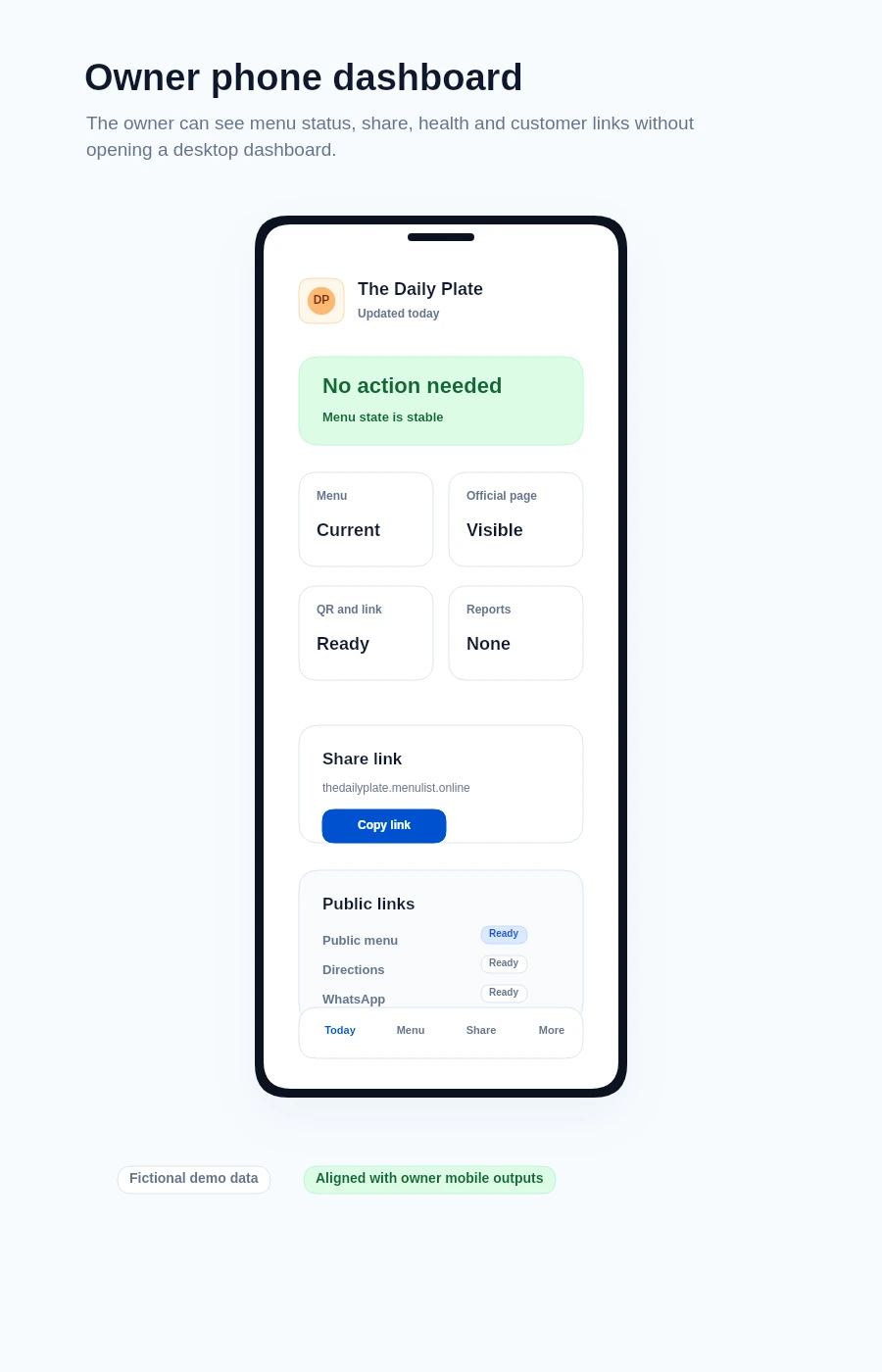
This demo visual shows the owner-side pattern behind the mobile dashboard: today, health state, share link, and activity stay reachable without a desktop-first workflow.

Mobile owner view

Today, link sharing, and activity stay close

The phone dashboard keeps the stable state, simple metrics, customer link, and recent activity in a compact owner view.

MenuList owner phone dashboard demo showing stable health, metrics, share link, and activity

Owner phone access

Phone-first operations are part of the product.

For non-technical SMB owners, this reduces the fear that MenuList requires office work, technical setup, or a laptop nearby.

Core operations from a phone

Owners can handle the updates that matter while standing at the counter, in the kitchen, or between customer calls.

Menu and publishQR, link, and screensFeedback and Health

Desktop is optional for daily work

Desktop remains useful for heavier review or precision setup, but the phone dashboard covers the daily operating path.

Status changesHours and settingsPublic checks

Low friction

The business should not depend on a laptop.

Owners can operate the official public menu from the device they already carry.

Main controls on phone

Menu updates, publishing, sharing, feedback review, Business Health, and key public-link controls are available from the mobile owner experience.

Daily work stays close

Share links, QR assets, WhatsApp sharing, temporary status, screens, hours, and key settings are easier to handle from the device owners already use.

Browser or saved app access

MenuList does not require a separate app-store install. Owners can use it from a mobile browser or saved app experience.

Built for real owners

The workflow is designed for quick owner decisions, not technical administration.

Owner phone access

Run MenuList from the phone in your hand.

Start from the current menu, then keep daily owner work practical from a phone browser or saved app.

Create customer link →Back to all features

Ready when your list is

Put one trusted customer link online.

Start from the menu, price list, catalogue, or service list you already have. MenuList prepares the customer-facing version and keeps the links and materials around it.

Create customer link →See plans

Owner approval before publishing

The public menu or service list should come from the business, not from old PDFs or scattered screenshots.

One approved list

Customers keep reaching the current version instead of old PDFs, screenshots, or scattered links.

Simple for one location. Ready for many.

Start with one business. Keep the structure ready for locations, governance, and public consistency.

MenuList

One approved customer link for your menu, services, and business details.

MenuList keeps your approved list behind every link, QR, and printed material customers use.

hello@menulist.ai
InstagramLinkedIn

Product

  • AI Menu Manager
  • How it works
  • Features
  • Multi-location
  • Pricing

Start

  • Public proof
  • Official Business Page
  • MenuList Tools
  • Create customer link
  • About
  • Contact

Resources

  • Menu Engineering
  • QR Menu for Restaurants
  • Digital Menu vs PDF
  • Google Business Profile Menu
  • Restaurant Menu SEO
  • AI Search & Menu Discovery
  • Official customer link
  • FAQ
  • Trust & Security

Legal

  • Privacy Policy
  • Terms of Service
  • Refund Policy

Get an AI summary of MenuList:

CClaudeCChatGPTGGemini

© 2026 MenuList. Built in India.

One public link. Easy for customers to find.