
MenuList
Feature overviewSee what MenuList can do for your business.

Start

Menu importStart from the menu or service list you already have.Menu content prepDescriptions, images, and languages prepared for review.Featured ChoicesGuide customers to popular, quick, and value choices.

Publish

Official Business PageOne customer link for public business details.QR menu and linksShare the current approved list everywhere.Print-ready kitTemplates, editor, QR, and printer files.

Operate

AI Menu ManagerUpdate your list by message, with approval cards.Owner phone dashboardManage daily menu work from your phone.Activity viewSee visits, QR opens, searches, and customer actions.Business HealthSee what needs attention today.Menu quality validationCatch prices, gaps, and readiness issues before publish.Customer feedback loopPrivate issue reports from public views.Public discoveryMake your public page easier for customers to find and read.
Start from one approved listThese features keep your customer link, QR, page, and print materials pointing to the latest approved list.
Create customer link
AI Menu ManagerHow it worksMulti-locationPricing
Resources
MenuList ToolsMenu EngineeringQR Menu GuideDigital Menu vs PDFGoogle Menu GuideRestaurant Menu SEOAI Search & Menu DiscoveryOfficial customer linkAll Resources
LoginStart menu preview

Official Business Page

One official customer link for your menu, services, and business details.

Menu or service list, hours, photos, directions, contact, WhatsApp, QR options, social links, and customer actions can live behind one owner-approved MenuList link.

Create customer link →See all features
Customer pagePublic page

One public page for what customers ask first

Customers can see the business identity, current menu or service entry point, hours, photos, contact actions, directions, and public details from the approved list.

Business profile

Name, location, hours, and customer actions sit near the menu.

Business detailsDirectionsCustomer actionsPayment and amenities
Business detailsDirectionsCustomer actionsPayment and amenitiesPublic page

Page journey

From menu link to official business presence.

MenuList gives customers one official business page, not just a QR code.

IncludePut the customer-facing details around the menu.UnifyReduce scattered business details across public places.StructureMake business information readable to customers and search tools.ShareUse the same link wherever customers arrive from.

Business page

Show the details customers need.

The Official Business Page gives owners one link for menu, hours, location, photos, contact, social profiles, customer actions, and public business details.

MenuHoursContact

Business profile

Name, location, hours, and customer actions sit near the menu.

Directions

Customers can find the business without hunting through messages.

Call or WhatsApp

Action buttons stay close to what customers are viewing.
Public confusion

Stop sending customers to scattered details.

Old files, copied links, and social posts often separate menu, hours, location, and contact information.

Old detailsScattered linksWrong context

One page

Customers can evaluate the business from one official link.

Payments and services

Business details can show payment methods, services, amenities, and dietary fit.

Public clarity

The page reduces guessing before a customer calls or visits.

Search-readable page

Prepare clear public business information.

Visible business details, public photos, key photo checks, and owner-managed actions help the page act as a clearer public page.

VisibleClearOwner copy

Public page

A shareable page becomes the business reference point.

Search-friendly details

Visible business information can be presented in a search-friendly way.

Owner-controlled

Public copy follows the details the owner controls.

Public proof

Make one link the version customers trust.

The Official Business Page can be used on WhatsApp, Instagram, Google profile, QR, packaging, and other customer-facing links.

WhatsAppInstagramQR

Official page

The page carries menu and business details together.

Customer actions

Call, WhatsApp, directions, and menu browsing stay close.

Consistent sharing

The same link can be placed wherever customers check.

Website doubt, answered

Can MenuList be my business website?

Yes. For many customer-facing SMBs, including restaurants, cafes, cloud kitchens, bakeries, salons, spas, clinics, studios, repair shops, and service-list businesses, MenuList can be used as the main customer link. Put it on Google Business Profile, Instagram bio, WhatsApp Business, QR codes, packaging, table cards, posters, bills, and print materials. Customers can see your current menu or service list, prices, hours, photos, directions, call/WhatsApp buttons, and other actions from one official page.

Owner-approvedUse as website linkQR and print readyNo ranking promise

Where it stops

MenuList is not a generic website builder, POS, delivery platform, accounting system, payroll tool, CRM, or ranking/citation guarantee. If you need a deep custom website with many pages, campaigns, blog content, careers, or advanced brand storytelling, keep a separate website. MenuList replaces the lightweight customer website many SMBs actually need: offerings, trust, location, contact, and action.

Public page proof

The official page shows business details and the current menu together.

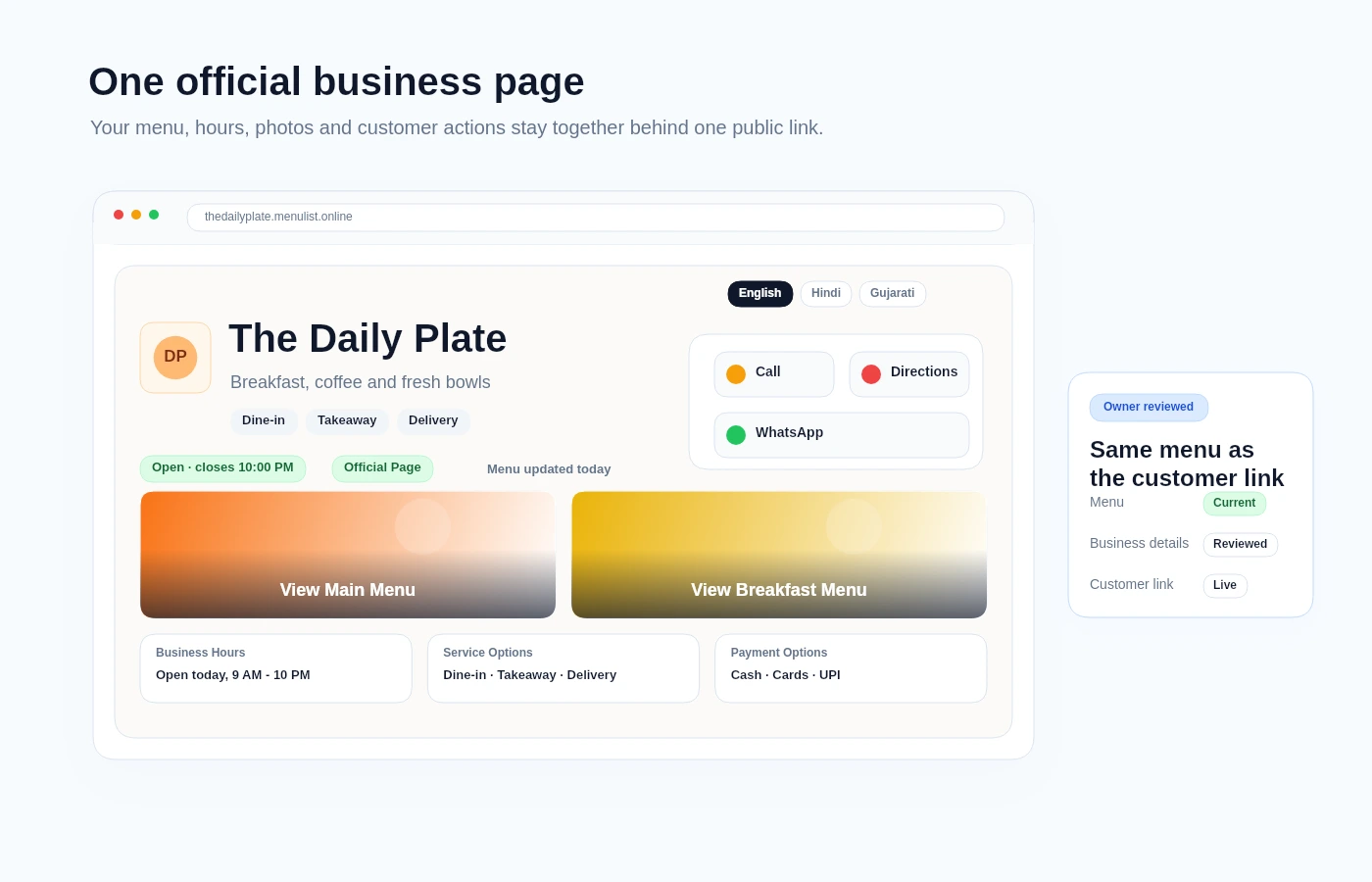
This demo visual shows the public authority layer behind the customer link: identity, open status, actions, menu cards, service options, and language controls in one place.

Official page

Customers see a clear business page before they act

The public page keeps contact actions, menu entry points, hours, service options, and source status close to the approved list.

MenuList Official Business Page demo showing business identity, actions, menu cards, and public status

Folded capabilities

Business discovery attributes belong here.

Business attributes become customer-facing proof when they appear near the menu, hours, directions, payment options, services, and actions customers need before they visit or order.

Details beyond the menu

Customers need the basics before they call, visit, order, reserve, message, or open the full menu.

HoursDirectionsContact

Official link and QR options

Owners can copy the page link, share a ready message, and use QR options without creating another public page system.

PaymentsServicesAmenities

Trust signal

The public page should feel official.

The page is strongest when it replaces scattered links without becoming a generic website builder.

Owner-approved page

The page can show menu, hours, photos, address, phone, WhatsApp, directions, social links, service details, and payment or amenity details where available.

Clear business information

Visible page details describe public facts without creating hidden claims.

Shareable everywhere

Owners can share the official link and QR options from desktop and phone.

Customer-facing clarity

Customers see current details, key photos, and clear actions instead of guessing which menu is right or whether the page is complete.

Public proof

Make one link the version customers trust.

Start from the approved menu, then publish an official page that carries the business details around it.

Create customer link →Back to all features

Ready when your list is

Put one trusted customer link online.

Start from the menu, price list, catalogue, or service list you already have. MenuList prepares the customer-facing version and keeps the links and materials around it.

Create customer link →See plans

Owner approval before publishing

The public menu or service list should come from the business, not from old PDFs or scattered screenshots.

One approved list

Customers keep reaching the current version instead of old PDFs, screenshots, or scattered links.

Simple for one location. Ready for many.

Start with one business. Keep the structure ready for locations, governance, and public consistency.

MenuList

One approved customer link for your menu, services, and business details.

MenuList keeps your approved list behind every link, QR, and printed material customers use.

hello@menulist.ai
InstagramLinkedIn

Product

  • AI Menu Manager
  • How it works
  • Features
  • Multi-location
  • Pricing

Start

  • Public proof
  • Official Business Page
  • MenuList Tools
  • Create customer link
  • About
  • Contact

Resources

  • Menu Engineering
  • QR Menu for Restaurants
  • Digital Menu vs PDF
  • Google Business Profile Menu
  • Restaurant Menu SEO
  • AI Search & Menu Discovery
  • Official customer link
  • FAQ
  • Trust & Security

Legal

  • Privacy Policy
  • Terms of Service
  • Refund Policy

Get an AI summary of MenuList:

CClaudeCChatGPTGGemini

© 2026 MenuList. Built in India.

One public link. Easy for customers to find.